WhatsApp AI Assistant

Let AI help respond to customer inquiries, collect clues and connect follow-up processes in WhatsApp conversations, and configure it according to corporate data and service rules.

24/7Automatically respond to customer inquiries
SecondsRespond to messages instantly
multilingualSupport cross-regional customer communication
AutomationHandle queries and basic tasks

core competencies

Use WhatsApp as the entry point for customer conversations, and let AI help respond to inquiries, collect clues, and connect to appropriate manual or system processes.

24/7Instant
Conversation

Instant conversation response

Help respond to common inquiries in WhatsApp and connect to live customer service or follow-up processes when needed.

  • Respond to common product and service questions
  • Quickly organize customer needs
  • Support live transfer and follow-up
AI
Understanding

natural language understanding

Understand customer questions and conversation content, help determine intentions, organize needs, and provide appropriate responses.

  • Understand spoken language and different expressions
  • Respond to the conversation
  • Identify situations that require human intervention
Knowledge
Data Access

Information and document inquiry

Connect corporate files and systems within your scope of authority so conversations can be based on reliable data.

  • Query product information and document content
  • Obtain customer or order information according to permissions
  • Integrate specified data sources
Automation
Automation

Conversational task processing

Designed according to enterprise processes, WhatsApp conversations can assist inquiries, notifications or create follow-up to-dos.

  • Check order or service status
  • Trigger notification or follow-up process
  • Organize information for the team to process
Scalable
Scalability

Support business expansion

You can start with customer service or sales inquiries, and then expand to membership, operations, and notification scenarios as needed.

  • Support different business processes
  • Can be gradually expanded according to needs
  • Suitable for teams of different sizes
Global
Multi-language

Multi-language support

Multilingual responses can be configured according to service areas to assist the team in handling cross-regional customer inquiries.

  • Support multi-language replies
  • Identify the languages commonly used by customers
  • Applicable to cross-regional business
Conversational Interface

Complete queries and actions in WhatsApp conversations

Customers can send messages through WhatsApp to inquire about product information, get service replies, or complete simple operations in a clear process.

  • Natural conversation operations: Use everyday language to make inquiries or service requests
  • Instant response: Quickly respond to customer questions and requests
  • Easy to use: No need to learn a new system, use it directly on WhatsApp
Google Drive AI Integration
Enterprise Data Integration

Integrate corporate data to support inquiries and business operations

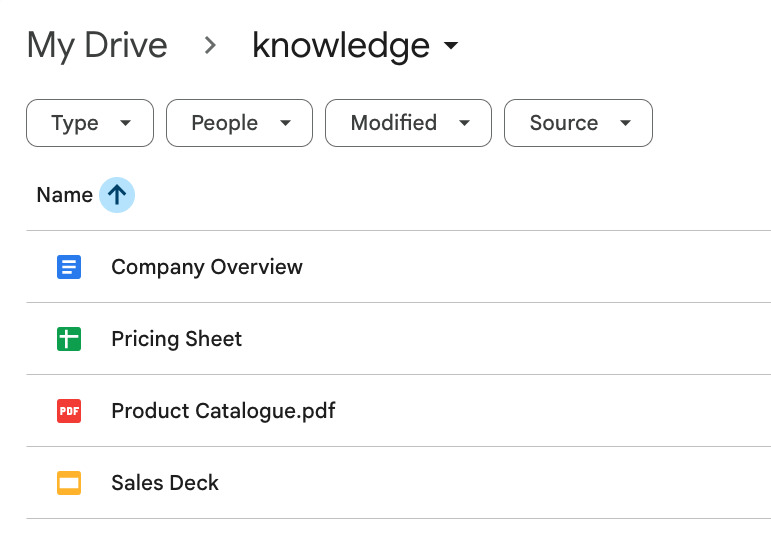
Cloud drives, internal databases and CRM/ERP systems can be connected according to business needs, so that WhatsApp conversations can respond to authorised information or connect to subsequent operations.

  • Document and data integration: Supports corporate document queries such as PDF, Word, spreadsheets, etc.
  • Business information inquiry: Query customer information, order status and related data according to permissions
  • Data update mechanism: Design synchronization methods based on data sources and security requirements

Use cases

Handle customer inquiries, sales interactions and daily operations through WhatsApp conversations

Support

Customer inquiries and support

Automatically respond to frequently asked questions, assist with customer inquiries, and transfer to human customer service when needed.

  • Automatically respond to frequently asked questions
  • Check product and service information
  • Provide order and service status
  • Transfer to human support
Sales

Product inquiry and sales follow-up

Respond to customer questions during conversations, provide product information, and assist with the sales process.

  • Product introduction and specification inquiry
  • Collect potential customer contact information
  • Schedule an appointment or consultation
  • Follow up on outstanding inquiries or orders
Engagement

Customer interaction and message push

Interact with customers through conversations, send event information and increase return visit rates.

  • Send event and promotion information
  • Respond to customer interactions and questions
  • Create customer segments and labels
  • Increase chances of return visits and repurchases
Operations

Operation notification and process processing

Use WhatsApp to handle daily operational notifications and simple tasks.

  • Send order and logistics notifications
  • Update a task or process
  • Synchronize system data changes
  • Support internal and external communication

Three Steps to Planning WhatsApp AI Assistant

First confirm the conversation scene, data source and real-person transfer method, and then gradually integrate AI into the customer service process

01

Connect WhatsApp to enterprise systems

Identify data sources that need to be connected, such as WhatsApp Business API, corporate documents, CRM or order systems.

02

Set response content and process

Import knowledge data, set response boundaries, transfer manual conditions, and connectable follow-up processes.

03

Step by step using AI in conversations

Start with FAQs or clear inquiries and gradually expand to lead collection, notifications and process assistance.

FAQ

Instructions for deploying and using WhatsApp AI Assistant

How long does it take to start using it?
The timing depends on WhatsApp Business API settings, data sources, permissions and integration scope. You can usually build a preliminary version faster if you start with a FAQ or a single process.
Does it support multiple languages?
It can support multiple languages such as Traditional Chinese, Simplified Chinese and English, and configure the tone, wording and response method according to the service scenario.
Can AI be customized according to brand or business needs?
Yes. The response tone, knowledge sources, solvable problems, manual transfer conditions and follow-up processes can all be designed according to actual business needs.
Can it be integrated with a CRM or other systems?
It can be integrated with CRM, order systems and internal databases as required, and can connect existing systems and authorization data through APIs.
When AI can't handle it, can it be transferred to a real person?
Yes. When you encounter complex problems, sensitive inquiries, or situations beyond the scope of authorization, you can be transferred to human support, and the conversation record will be kept for follow-up.
How to ensure data security?
You can choose appropriate data processing, access control and recording methods according to enterprise requirements, and limit the range of data that AI can query and respond to.
How to ensure the quality of AI responses?
It can cooperate with response evaluation and system monitoring to track common problems, reasons for manual transfer, abnormal responses and conversation records, and continuously improve service quality.

Start with a WhatsApp customer conversation scenario

First clarify common queries, data sources and manual transfer processes, and then design an AI assistant suitable for business use